Plan your days with your own AI
What it does
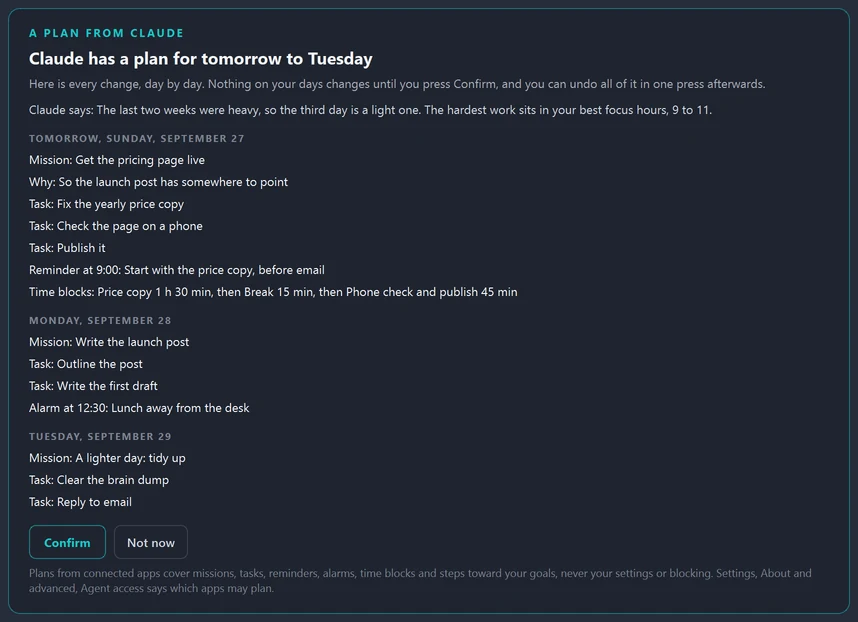
You ask Claude, in the Claude app, something like "plan my week" or "plan tomorrow around the dentist at 3". Claude asks Hawser for your planning brief and your days, works out a plan, and sends it to Hawser. A small notice says Claude has a plan and that nothing changes until you say yes.
The plan opens at the top of the Calendar, every change day by day, with anything it would replace pointed out and Claude's own note on why it planned it that way. Confirm puts it on your days. Not now leaves them as they were. After a Confirm, one press of Undo takes the whole plan back, apart from anything you have changed since.
On the morning of a planned day, Hawser opens with that day's plan already filled in, so you confirm it and start instead of facing a blank page. A plan can cover today and up to 31 days ahead.
Claude is also told to plan like a person who knows you: to put the hardest work in your best focus hours, leave slack, plan lighter after a hard stretch, work back from your goals' dates, and never pile more focused hours into a day than you said are realistic. If your Claude has its own calendar connector, such as Google Calendar, it is asked to read that too and treat your events as fixed. Hawser itself never reads your calendar.
Connect the Claude app in three steps
You need Hawser running on your PC, the Claude app for Windows, and your own Claude account.
- In Hawser, press Connect Claude. It is in Settings, About and advanced, Agent access. If agent access is off, pressing it switches it on and says so.
- In the Claude app, press Install. Hawser hands the Claude app its extension, a small file that comes with Hawser. If no Install window appears, press Show the file in Hawser and drag the file onto Claude's window.
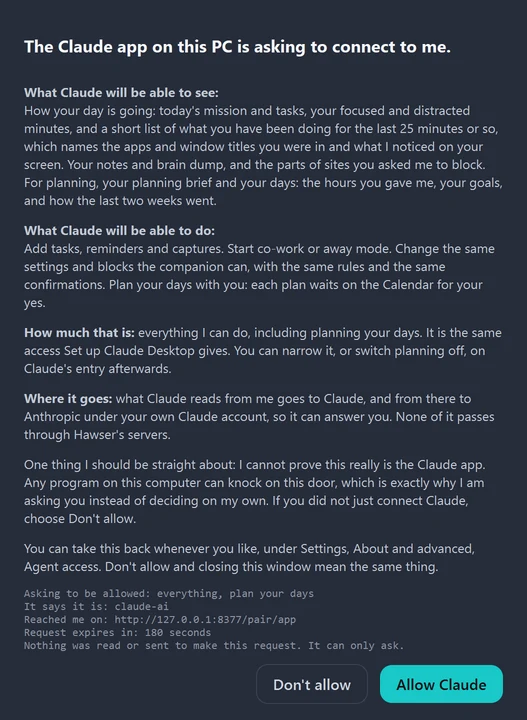
- In Hawser, press Allow Claude. The first time Claude reaches Hawser, Hawser shows a card naming Claude and saying in plain words what it will be able to see and do. Nothing connects until you press Allow.
That is all. There is no key to copy and nothing to type. Then ask Claude to plan your week.
What Claude can see
Only what its connection allows, and the card above says it before you press Allow. The Claude app's connection allows everything Hawser can do, including planning your days. With that, Claude can read:
- How your day is going: today's mission and tasks, your focused and distracted minutes, and a short list of what you have been doing for the last 25 minutes or so, which names the apps and window titles you were in and what Hawser noticed on your screen, as words. Never a screenshot.
- Your notes and brain dump, and the parts of sites you asked Hawser to block.
- For planning, your planning brief: the hours and days you gave Hawser, how many focused hours a day you said are realistic, your goals with their dates and steps, how the last 14 days went, your best focus hours and days, and what is already on the next 14 days.
- Your days, as the Calendar shows them.
What Claude reads goes to Claude, and from there to Anthropic under your own Claude account and Anthropic's terms. None of it passes through Hawser's servers: Hawser and the Claude app talk on your own PC, over a connection that cannot leave the machine. You can narrow what Claude may do, or switch planning off, on Claude's entry in Settings, About and advanced, Agent access. The privacy policy lists every field.
What Claude cannot do
- Change your days without your yes. Every plan waits for Confirm, unless you switch on "Let Claude change my plans without asking" for it. That is off until you turn it on, and even then Hawser tells you and keeps the Undo.
- Touch your settings or your blocking through a plan. A plan covers missions, tasks, reminders, alarms, time blocks and steps toward your goals, nothing else. Outside of plans, the Claude app can do what Hawser's own companion can, under the same rules and the same confirmations, and you can narrow that on its entry.
- Reach Hawser from anywhere but your PC, or while Hawser is closed.
- Plan days gone by, or more than 31 days ahead.
Which AI apps work today
| App | Plans your days with Hawser? |
|---|---|
| Claude app for Windows | Yes. Tested from start to finish, and connected in three presses. |
| Claude Code | It connects with a command Hawser copies for you. It is not given planning unless you switch that on, on its entry in Settings, and the Claude app is the way that has been tested. |
| ChatGPT | Not yet. |
| claude.ai, and AI apps on the web or a phone | Not today. They run in their maker's cloud, and Hawser only listens on your own PC. |
| Other AI apps | More are coming. None is promised, or given a date, until it works. |
Hawser itself is Windows only, on Windows 10 and 11. Mac is on the roadmap.
Why it costs nothing extra
The thinking happens in your own Claude, on your own Claude account. Hawser hands it what it needs and shows you the plan, so planning counts toward your Claude plan like any other chat, and Hawser charges nothing on top of its own price.
A note from Jacob
So the first time I tried this, I connected my own Claude to Hawser and asked it to plan three days of getting ready for my launch, and I really liked the way it did it. Nothing changed until I pressed Confirm, which was the part I cared about most, because I don't want any AI moving my day around without asking me first. If you try it and something is confusing or broken, tell me, I read everything that comes in
Frequently asked questions
Does planning with Claude cost extra?
Not from Hawser. The planning runs on your own Claude account, so it counts toward your Claude plan like any other chat, and Hawser charges nothing on top of its own $25 a month or $250 a year.
Does Claude see my screen?
Not live, and never a screenshot. It can read a short list of what you have been doing for the last 25 minutes or so, which names the apps and window titles you were in and what Hawser noticed on your screen, written as words.
Can Claude change my plans without asking?
Only if you switch that on for it. Let Claude change my plans without asking is off until you turn it on, on Claude's entry in Hawser's Settings. Even then Hawser tells you what changed and keeps the one press undo.
Does it work with ChatGPT?
Not yet. Today planning works with the Claude app for Windows, the one that has been tested from start to finish. More AI apps are coming, and none is promised, or given a date, until it works.
Can I plan from my phone or from claude.ai?
Not today. Hawser and the Claude app talk to each other on your own PC, over a connection that cannot leave the machine, so a chat running in a browser or on a phone cannot reach it.
Is Hawser free?
Hawser is free for 14 days with no credit card, then $25 a month or $250 a year. Planning with your own Claude is included. See pricing